How licence progress is measured
Which entries count toward a licence requirement, why a total can be lower than you expect, and how the estimate is worked out.
Every number in licence progress is worked out by Pilot Lab from the entries in your logbook, each time you look. Nothing is typed in by hand and nothing is cached. This page explains what is counted, so you can reconcile a bar with your own records.
What counts toward an hours requirement
An entry counts when all of these are true:
- It is not a draft. Finalised, signed and locked entries count, and so do imported entries once you have reviewed them. Drafts count toward nothing until you finalise them.
- It is not deleted.
- It is an aircraft entry. Simulator and ground sessions do not count toward licence hours.
- It is in the right category of aircraft, for syllabi that name one (see below).
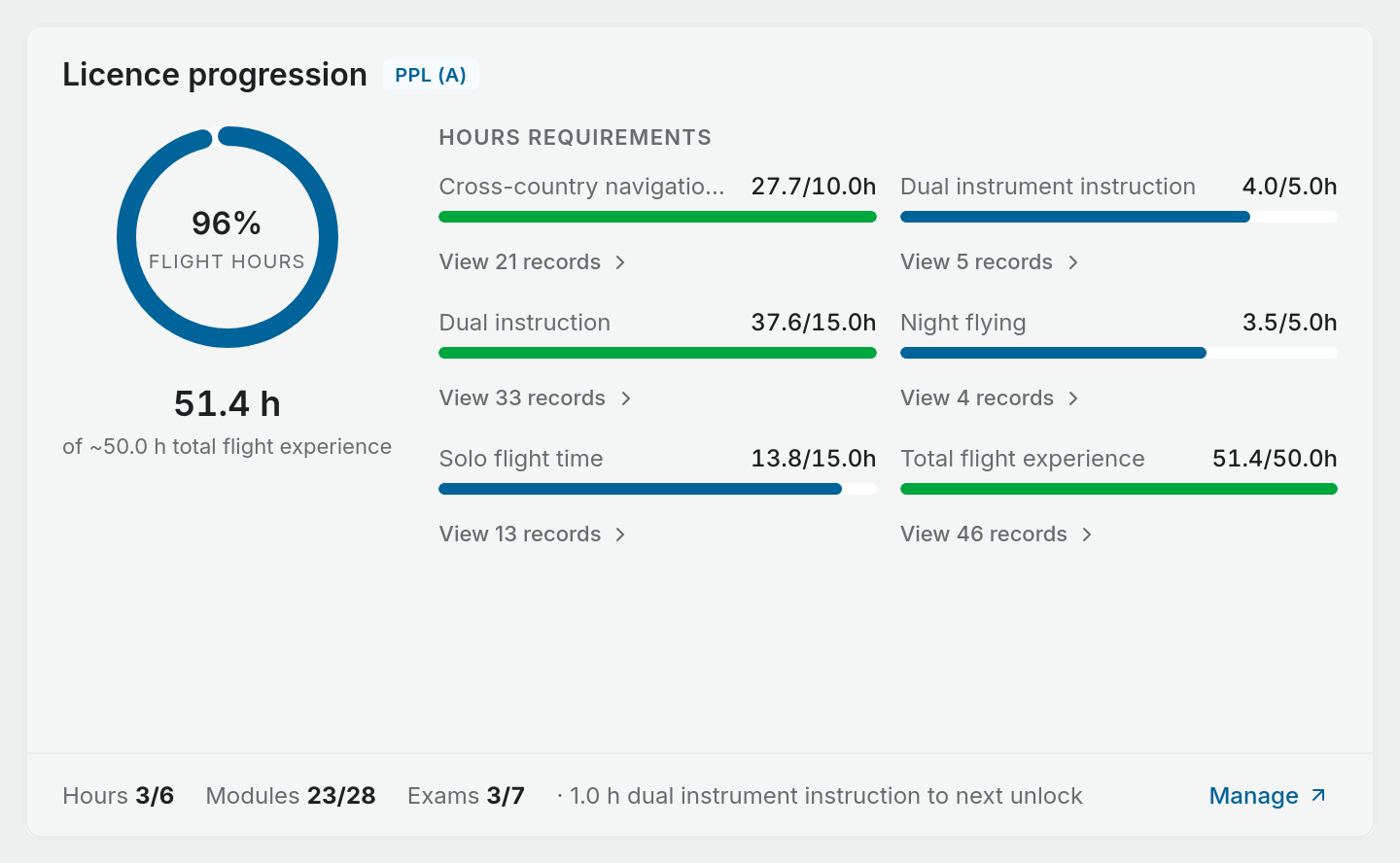
Each requirement reads one column of your logbook: total time, dual received, solo, pilot in command, night, cross-country or dual instrument. A flight adds whatever it has in that column. One flight can count toward several requirements at once, which is how a dual night cross-country moves the dual, night and cross-country bars together.
To check a bar, select View N records under it. The list shows every flight counted, with the time each one contributed, and the total at the bottom matches the bar.
Aeroplane and helicopter syllabi
Each NZ PPL, CPL and ATPL preset is for one category of aircraft. The aeroplane syllabi count aeroplane time only, and the helicopter syllabi count helicopter time only. Time in a helicopter does not appear in a PPL(A) bar, and the other way round.
The NZ Instrument Rating preset does not name a category, so it counts time in any aircraft.
An opening balance (the totals you brought forward from a previous logbook) does not record which aircraft the hours were flown in. Unless you record its aircraft category, Pilot Lab cannot tell whether those hours were aeroplane or helicopter time, so a category syllabus leaves them out. The bar says so, for example "12.0h brought forward, not counted", with a Record it in settings link.
To count them, open Settings > Opening totals, select Adjust on the line and choose its Aircraft category. Only do this if every hour on that line was flown in one category: a line set to Aeroplane counts toward aeroplane syllabi only. Totals that came from an import cannot be edited there. For a line that mixes categories, logging those flights individually, or importing your old logbook, is what lets them count.
Why a bar can look lower or higher than you expect
- A flight is still a draft. Finalise it and the bar updates.
- The flight is in another category, or it was logged as a simulator session.
- The requirement is narrower than the column. A syllabus may ask for cross-country time as pilot in command, or night time split between dual and solo. The logbook column counts all of it, so the bar can show a requirement as met when the specific condition is not. Treat a green bar as a sign you have the hours in that column, not as confirmation the rule is satisfied.
- You set a custom target. A requirement marked Custom is measured against your own figure rather than the preset.
Training stages and exams
Training stages and exams are counted separately from hours. They are not blended into the donut percentage, because an exam pass is not flight time.
- A module is complete when you mark it complete, or confirm a suggestion. Some modules must be done more than once and show a count such as 1/3.
- A stage is ticked when every module in it is complete, and shown as in progress when at least one is.
- An exam counts once it is passed and any knowledge deficiencies on it are signed off. See recording exams and knowledge deficiencies.
If a syllabus has no hours requirements at all, the donut shows the share of modules and exams complete instead, and is captioned "complete" rather than "flight hours".
How the projected completion is worked out
The estimate on the dashboard uses two figures:
- What you still need. For each hours requirement, the gap between your total and the target, added together.
- How fast you are flying. The time you logged in counted entries over the last 90 days, turned into hours per month.
The estimate is the first divided by the second, shown as months and a month and year. It is hidden when every requirement is met, and when you have flown less than half an hour a month on average over the last 90 days, because a date projected from almost nothing would be misleading.
It is an estimate of when you would reach the hours at your current pace. It says nothing about when you will be ready for a flight test.
Where the requirements come from
The preset figures are taken from the CAA advisory circulars for each licence (for example AC61-3 for the PPL). Pilot Lab keeps each preset versioned and shows the version on the active syllabus card. Rules and circulars change, so check the current CAA publications and talk to your instructor before relying on any figure. You remain responsible for meeting the requirements for your licence.