Check your currency, medical and flight review
See at a glance whether you are current to carry passengers and fly IFR, and when your medical and flight review run out.
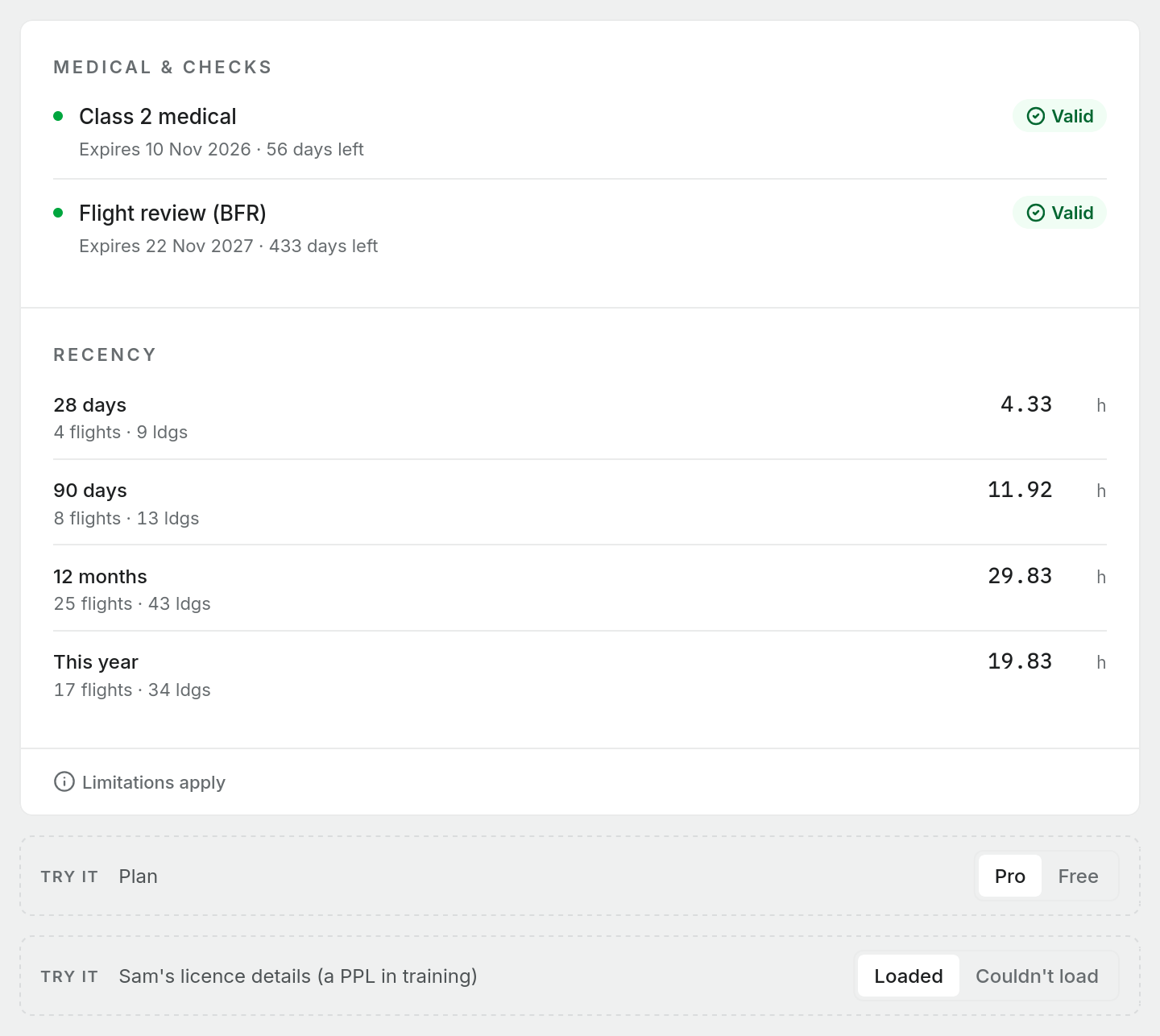
The right-hand column of your logbook Dashboard is a status panel. It shows your recent flying, whether you meet the recency checks for carrying passengers and for your instrument rating, and, on Pro, when your medical and flight review expire. On a narrow screen the same panel sits above the dashboard instead of beside it.
Everything in it is worked out from your logbook each time you look.
Recency
Recency lists your flying over the last 28 days, 90 days, 12 months and this year: flights, landings and hours. It counts aircraft entries only.
Passenger carrying
This section checks your day and night take-offs and landings over a rolling 90-day window, separately for each aircraft type. Recent flying in a C172 does nothing for your currency in a PA28. Only flights you logged in command count: PIC, solo and instructing. Dual, PIC under supervision and co-pilot flights do not.
- If you have flown more than one type in the window, a tab strip lets you switch between them. A green or amber dot on each tab shows its state, and the panel opens on the weakest one.
- Each check shows your count against the minimum of 3, with a bar: green when met, amber when short, red when you have none.
- The pill in the header reads Current when your day take-offs and landings for that type are met, and Expiring when they are not.
Day and night are judged separately. The pill and the tab dot follow the day checks only, so a pill that reads Current does not mean you are current at night. Before carrying passengers at night, read the night take-off and landing rows.
If a flight has landings but no take-offs written, Pilot Lab counts it as making as many take-offs as landings, by day and by night. The take-off row says how many flights were counted this way. A take-off figure you did write, including 0, is used as written.
Types you have flown before but not in the last 90 days are listed under Other types flown, with the date you last flew each.
Only finalised, signed, locked and reviewed imported entries count. A draft does not.
Instrument rating
The pill in this section reads Current only when both of these hold:
- a passed examiner check in the last 12 months. The line under the title shows when your check is valid until, when it lapsed, or that no passed check is on record. Pilot Lab reads it from the Instrument Proficiency Checks you record under Profile settings > Flight reviews & checks or on a logbook entry. A failed, partial or incomplete check does not renew it.
- the 90-day limb, shown below as met or not met, made up of three checks:
- Total instrument hours, minimum 3.00. Simulator instrument time counts here as ground time.
- In-flight instrument hours, minimum 1.00. Simulator time does not count.
- Instrument approaches, minimum 3. Only one approach flown in a simulator is credited.
An examiner check passed inside the 90 days stands in for the hours, but not for the approaches.
Only recorded actual or simulated instrument time counts. Time in the IFR column records the flight rules, not the conditions, so a flight with IFR time and no instrument time is not credited. The section lists how many such flights it found, so you can add the instrument time if you flew it.
When the sections appear
Passenger carrying and IFR recency depend on what you hold. Record your licence and ratings in Profile settings > Licences and the panel shows the checks that apply: passenger carrying for a PPL, CPL or ATPL, and the instrument rating section for an instrument rating. If you have recorded no licence at all, neither section shows. If Pilot Lab cannot load your licence details, it shows both rather than risk hiding one you need.
If Pilot Lab has no recency rules for your workspace's logbook authority, a section reads Not evaluated instead of a verdict. That means the check was not made, not that you are out of currency.
Medical and flight review expiry (Pro)
This is a Pro feature. On Pro, a Medical & checks section at the top of the panel lists:
- your medical, by class, from Profile settings > Medicals
- your Flight review (BFR), from Profile settings > Flight reviews & checks
Each row reads Valid, Expiring or Lapsed, with the expiry date and the days left or the days since it lapsed. A row turns to Expiring in the weeks before its date. Lapsed items sort to the top.
Only what you have recorded appears. If you have not entered a medical, there is no medical row, rather than a false "lapsed" warning. On Free the section is not shown at all.
The Medical & checks section is shown on your dashboard. Pilot Lab does not currently send you an email or notification when a medical or flight review is about to expire.
Recording a medical or flight review
- Medicals: choose the Medical Class, then enter the certificate number, who issued it, the issue date and the expiry date. The Medicals page itself shows your current medical and the days remaining on any plan, and keeps a Medical history.
- Flight reviews & checks: record each review with its type, result, the date completed and the expiry date. Where your authority's rules define the flight review interval, Pilot Lab fills in a suggested expiry from the completed date, which you can change. Otherwise enter the expiry yourself. A failed, partial or incomplete review is kept in your history as Not passed and does not renew your flight review. If you have never had a review, enter your Date of issue flight test under BFR compliance so the 24-month clock has a starting point. If an exemption applies to you, choose it under BFR exemption; the row then shows Exempt with the basis instead of a countdown.
What this panel does not do
The checks follow the rules configured for your aviation authority, and Limitations apply at the bottom of the panel explains what they cover. They cannot see flying you have not logged, time logged in the wrong column, or requirements that depend on more than your logbook. The panel is a prompt to check, not a ruling that you are legal to fly. Before carrying passengers or flying IFR, confirm your currency against the current rules. You remain responsible for that decision.